Accessible Web Design
Due on Sun, 03/08 @ 11:59PM. 15 Points.
Background
Learning Objectives
The goal of this assignment is to get you thinking about designing websites such that they are accessible to people of different abilities. As web designers, we have the responsibility to make sure that everyone has access to what we create regardless of ability, context, or situation.
If you haven’t already, go through the Lynda.com HTML/CSS Tutorial discussing structuring web content. This whole section is super important - make sure to get through at least the tutorial on on WAI-ARIA roles.
WAI & WCAG
The Web Content Accessibility Guidelines (WCAG) are a set of web accessibility guidelines published by the Web Accessibility Initiative (WAI) of the World Wide Web Consortium (W3C), the main international standards organization for the Internet. They are a set of recommendations for making Web content more accessible, primarily for people with disabilities—but also for all user agents, including highly limited devices, such as mobile phones.
There are three different levels of standards that WCAG2 (the newest set of standards) proposes: A, AA, and AAA, where A has the lightest requirements and AAA the heaviest. It’s recommended that all web content to conform to at least WCAG2 AA guidelines, which means that all A and AA guidelines are followed. You can find a quick reference to the WCAG guidelines here.
Part 1: Spotify UI (Again)
Your job for this part of the assignment is to edit the Spotify interface to conform to WCAG guidelines. This will give you some experience with using accessibility regulations in a practical setting and prepare you for building your final projects in an accessible manner.
For a good example of good/bad accessibility practices used on the same website, check out W3C’s Before and After Demonstration.
Setup
For reasons that will be explained below, the interface that you will be working with for this part will be displayed via server-side rendering. This means that, instead of directly opening the HTML file, you will instead run a server that will render your HTML in the browser.
- First, download the project files here: download hw06.zip
- Install Node.js on your machine.
- Open a terminal window and navigate to the
your_taskdirectory. - Type
node --versionand hit Enter. If Node.js was installed correctly, it should report back what version you have installed. - Type
npm install. This installs the Node packages needed to run the assignment.
Now, in order to run the assignment, all you have to do is run npm start in your terminal window while in the project directory. Open a browser window to http://localhost:8080 and you should see the webpage! As long as you keep the server running in the background, you should just need to refresh the browser window to see your saved changes happen.
Unless you’re curious (in which case you should look through server.js), don’t worry about how this all works - you might fall down an unfortunate rabbit-hole.
Lighthouse
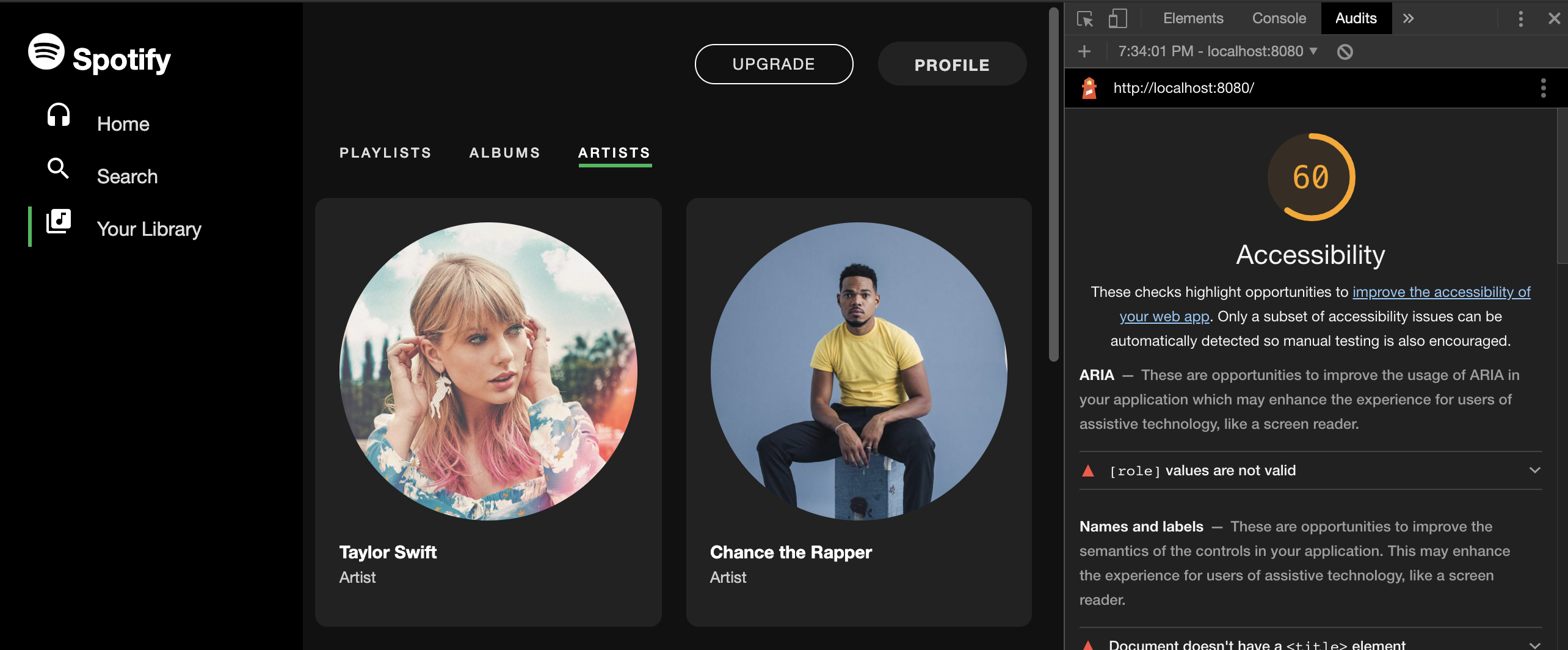
For this assignment, we will be using the Lighthouse Chrome extension as measure of webpage accessibility (sorry, this does mean you are required to use Chrome for this assignment). The reason that we’re using a server is that Lighthouse doesn’t run on local HTML files.
Once your server is running and you have the page open, open Chrome’s developer tools and navigate to the “audits” tab. There, you should be able to generate a report with Lighthouse.
Your Task
The score that we care about here is Accessibility. If your webpage scores a 100, you’ll get full points for this part of the assignment. Feel free to edit any and all files in order to accomplish this (except for server.js). Part of the challenge of this assignment is parsing all the files that we’ve previously ignored to figure out how the interface works.
You should also feel free to edit the visual design and layout of the interface however you’d like in order to achieve this.
Hint: Once you open the folder and look at the HTML, the first question you should ask yourself is how exactly are we generating the artist cards? You will likely need to look up some JS documentation for this - a skill vital to any debugging, not just accessibility.
Just because your webpage scores highly doesn’t necessarily mean it’s truly accessible. Lighthouse also gives many suggestions for accessibility improvements outside the scope of what they consider easily identifyable. Try to follow WCAG AA guidelines as closely as possible when fixing your page!
Submission & Grading
For this submission, first delete the node_modules folder and then zip the entire directory. Do not delete or move any files except for node_modules (although creating ones is allowed!).
- Spotify UI:
- Lighthouse Accessibility Score === 100 (6 pts)
Note: 1 point will be deducted from this score for each ten-point range below 100 your assignment falls into. For example, if you score a 94 on accessibility, you will get 5 points here. If you score a 86, you’ll get 4 points, etc.
Part 2: Accessibility Critique
Your Task
Your job for this part of the assignment is to write a short essay discussing the accessibility of any web page or platform.
This assignment is meant to be rather open-ended, getting you to think about how commercial platforms are (or aren’t) designed with inclusivity in mind. You can technically choose a page without a lot going on (e.g. a simple login page), but that probably won’t make for a very good essay.
Feel free to be creative with your papers! Your essay should:
- Include a discussion of the site’s purpose and user goals.
- Not be a list of simple WCAG rules the website breaks.
Some ideas for paper topics (feel free to use any number of these or craft your own!):
- Inspect the source code and interface design of a website, discussing accessibility problems with the interface that may not fall under WCAG guidelines (i.e. usability, page structure, etc.)
- Discuss how the interface goes about presenting content multi-modally, perhaps targeted towards user classes with different levels of ability
- Try navigating the interface using only a screen reader and keyboard and talk about your experience
- Conduct research about the company or site’s history with legal issues surrounding web accessibility (e.g. Domino’s)
In your analysis, you should read and cite at least 4 external articles to support your arguments (not counting the website you’re critiquing itself). These can also be readings that we’ve covered at any point throughout the course.
Submission & Grading
Your paper should be between 500-800 words, double spaced, 12-point font, Times New Roman. Make sure your name and section are listed at the top of your submission.
- Discusses the site’s purpose and user goals (1 pt)
- Meaningfully cites at least 4 external sources (2 pts)
- Paper is between 500-800 words (1 pts)
- Quality of discussion and writing (5 pts)
Optional Resources
Below are some fantastic (and totally optional) readings about the current state and future of accessible design:
- All Technology is Assistive - Sara Hendren
- Beyond Automated Accessibility Testing - Manuel Matuzovic
- Design for User Empowerment - Richard E. Ladner
- Inclusive Design, Accessible Design, Universal Design: What’s What? - Kat Holmes
- Understanding Accessibility in Collaborative Writing for People with Vision Impairments - Das, M., Gergle, D., and Piper, A.M.
- WebinSitu: A Comparative Analysis of Blind and Sighted Browsing Behavior - Jeffrey P. Bigham
Some labs at NU that are working with HCI research and/or inclusive design and education:
What to Turn In
- A zip file of the edited
your_taskfolder without thenode_modulesfolder included - A PDF version of your interface critique